Plan renovations, refurbishments and home construction in a structured way
 Large renovation, refurbishment or home construction projects quickly involve numerous cost items, contractor quotes, invoices, schedules and material orders. The new TYPELOG Renovation Planner for Microsoft Excel brings all this information together in one connected XLSX project file.
Instead of managing budgets, quotes, invoices and tasks in separate spreadsheets or notes, the data is linked together. Changes automatically flow into cost overviews, warnings, statistics and the dashboard.
From the first budget to the final invoice
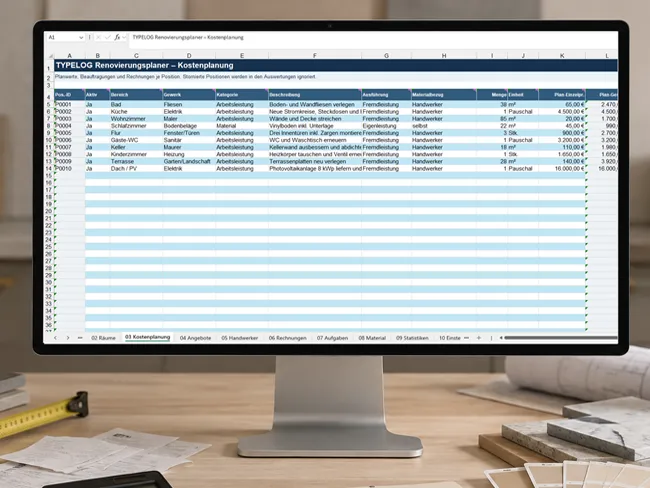 The TYPELOG Renovation Planner supports a construction or renovation project from the initial budget planning through to final cost control.
Individual budgets and reserves can be defined for rooms or construction areas. Excel automatically calculates the actual usable budget.
Planned costs, commissioned work and received invoices are then linked to these budgets.
This means you can see not only what was originally planned, but also which costs have already been committed, which invoices have been received, what has already been paid and how much budget remains.
Planning is not just about entering costs. What matters is knowing what has already been planned, commissioned, invoiced and paid.
The dashboard shows where your project really stands
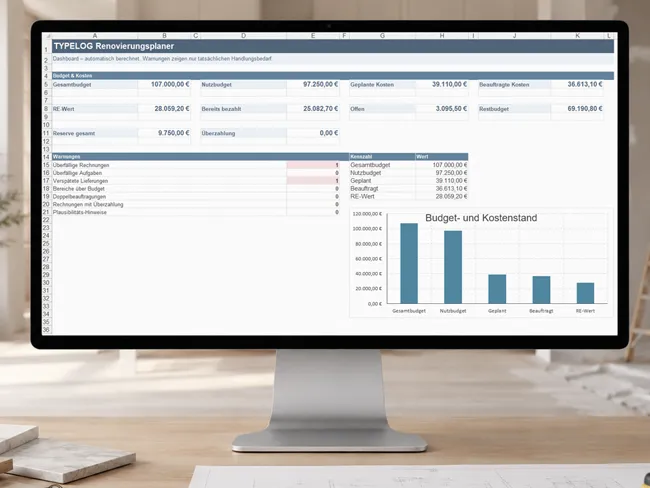
 Total budget and reserve
The Renovation Planner automatically calculates the total budget, reserve and actual usable budget from the budgets of active rooms and areas.
Planned and commissioned costs
Planned values from the cost planning sheet and actually commissioned quotes are evaluated separately. This makes it clear which costs are still only planned and which have already been contractually assigned.
Invoices, payments and remaining budget
Invoice values, amounts already paid, outstanding balances and possible overpayments automatically flow into the overview. The remaining budget also takes recorded invoice values into account.
Automatic warnings
The dashboard highlights overdue invoices and tasks, delayed deliveries, areas over budget, duplicate commissions, overpayments and inconsistent entries.
Plan budget and progress separately for every area
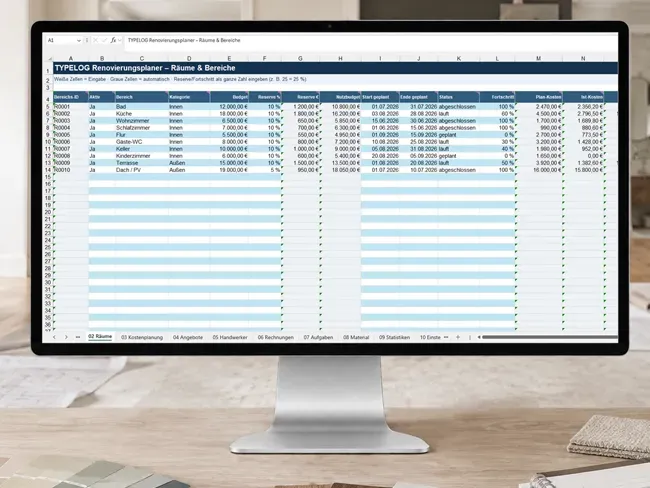 Each room or construction area receives its own entry with budget, reserve, usable budget, planned period, status and progress. Related cost items and invoices are automatically assigned to the respective area. This automatically produces planned costs, actual costs and remaining budget for each individual area. The system is not limited to traditional rooms such as bathrooms, kitchens or living rooms. Outdoor areas, roofs, plots or individual construction phases can also be created as separate areas.
Track every cost item from planned value to invoice
Costs can be recorded by area, trade, category, execution type, material reference, quantity, unit and planned unit price. The planned total amount is automatically calculated from quantity and unit price. If a quote is later commissioned, its contracted value automatically appears against the corresponding cost item. Incoming invoices and payments are also assigned. This gives you key values for each position side by side:
Planned total · Contracted value · Invoice value · Amount paid · Plan variance
This makes it easier to identify at an early stage which items are turning out cheaper or more expensive than originally planned.
Assign multiple contractor quotes to one cost item
 Compare quotes directly
Multiple quotes can be stored for a single cost item. Supplier, quote number, quote date, validity, net amount, VAT, gross amount, additional costs, discount, total price, earliest start date and expected duration can all be compared.
Mark the commissioned quote
The selected quote is marked as commissioned. Its total price then automatically flows into the cost planning sheet as the contracted value.
Detect duplicate commissions
If several quotes for the same cost item are accidentally marked as commissioned, the Renovation Planner automatically generates a warning.
Keep all important contacts directly with the project
Companies, trades and contact persons can be managed centrally. In addition to telephone, mobile number, email, website and address, fields are also available for your own customer number, personal rating and notes. This keeps more than just contact details easy to find. Your own experience with individual contractors and suppliers can also be documented directly within the project.
Keep partial payments, credits and overpayments under control
Different invoice types
Deposits, progress invoices, partial invoices, final invoices, material invoices, credit notes and cancellations can be recorded separately.
Calculate payment status automatically
The Planner automatically calculates the remaining amount and payment status from the invoice amount, amount already paid and due date, for example open, partially paid, paid or overdue.
Plausibility checks
The Planner detects various inconsistent entries, such as a missing payment date, missing payment amount, a due date before the invoice date or an excessive credit note.
What needs to be completed and when?
- Tasks can be assigned to an area and trade and provided with a responsible person, priority, planned start date, due date, status and progress.
- Dependencies between tasks can also be recorded. For example, sanitary installation can be documented as dependent on completion of tiling work.
- Overdue tasks are detected automatically. The Planner also checks typical inconsistencies between dates, status and progress.
Manage orders, delivery dates and returns
Material items include fields such as supplier, article number, quantity, unit, unit price, total price, order date, delivery date, actual delivery date, delivery status and payment status. Return deadlines and return status can also be documented. Particularly useful: A delayed delivery remains traceable even after the material has eventually arrived. The original scheduling deviation is therefore not lost.
One project instead of ten separate spreadsheets
01 Dashboard
Budget, costs, payments, remaining budget and warnings at a glance.
02 Rooms
Budgets, reserve, schedules, status, progress and costs for each room or construction area.
03 Cost Planning
Cost items with planned value, contracted value, invoice value and variance.
04 Quotes
Compare multiple quotes and document the commissioned offer.
05 Contractors
Manage contractors, suppliers, contact persons and your own ratings.
06 Invoices
Monitor invoices, payments, due dates, credit notes and outstanding balances.
07 Tasks
Organise tasks, schedules, priorities, responsibilities and dependencies.
08 Materials
Track orders, deliveries, costs and returns.
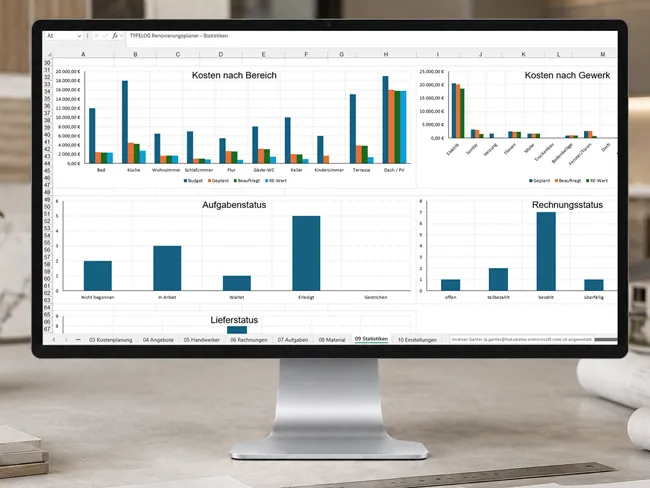
09 Statistics
Automatic evaluations by area, trade and status, including charts.
10 Settings
Manage dropdown lists and your own values for trades, units, status, categories and other selection fields.
When individual invoices quickly become a major project
With new construction, major refurbishment or extensive renovation work, many trades often run in parallel. Quotes are requested, work is commissioned, deposits are paid, materials are ordered and schedules change. The TYPELOG Renovation Planner connects this information. This makes it possible to see, for example:
how much budget reserve remains · which quotes have already been commissioned · which invoices are still outstanding · which deliveries are delayed · which tasks are overdue · which rooms or construction areas are over budget
The Planner is therefore suitable for individual renovation projects as well as extensive construction and refurbishment projects.
DE/AT, Switzerland and English
The TYPELOG Renovation Planner is available in several localised versions:
 DE/AT for German-speaking users in Germany and Austria (EUR)
Included in the download
Start immediately or explore the example first
1 × TYPELOG Renovation Planner.xlsx
Blank working file for your own project.
1 × TYPELOG Renovation Planner Example Data.xlsx
Fully completed example file for learning, testing and exploring the functions.
1 × detailed English PDF guide
Explains the structure, entries, relationships and operation of the Renovation Planner.
The example file can be modified and tested as much as you like before you begin working with your own project file.
Microsoft Excel, no macros and no additional software
XLSX file for Microsoft Excel
The Renovation Planner was developed for Microsoft Excel and is supplied in XLSX format.
No macros or VBA
Calculations and links are based on Excel functions. No macros need to be enabled.
No subscription
The Renovation Planner is a locally used Excel file. No additional software or ongoing online service is required.
Compatibility
Google Sheets and OpenOffice are not part of the supported functionality. Microsoft Excel is required for the intended use.
 TYPELOG Renovation Planner
Plan, compare and keep your costs under control.
Manage budgets, quotes, invoices, schedules, contractors and materials in one connected Microsoft Excel file.