Track working hours easily when working remotely
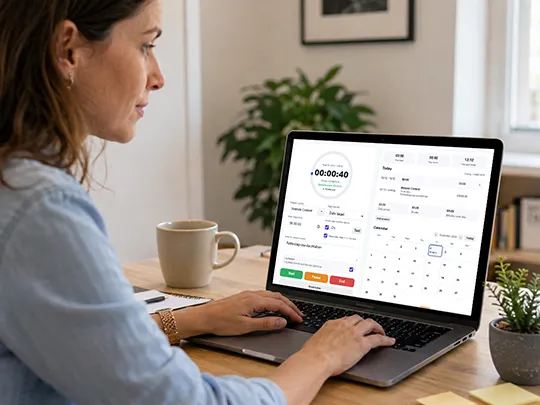 Remote work often means dividing your working time between different clients, projects and individual work sessions. For freelancers and self-employed professionals in particular, it can quickly become difficult to remember exactly how many hours were actually spent on a specific job.
TYPELOG Worktimer tracks working hours directly while you work. Projects, activities, breaks and notes can be assigned to each work session. The application runs locally on your own device, requires no user account and can also be used without a permanent internet connection.
Why is accurate work hours tracking important for remote work?
Remote work often provides greater flexibility in terms of both working location and working hours. At the same time, the clear structure of a traditional working day is often missing. Working on a client project in the morning, attending a meeting after lunch and completing another work session in the evening is perfectly normal for many self-employed professionals.
The problem often becomes apparent later: How many hours were actually spent on client A? How long did project B take? Which working hours belong to a specific task? Anyone who has to reconstruct this information at the end of the week from calendars, emails and memory spends additional time on administration and may have to estimate working hours.
TYPELOG Worktimer therefore records your hours directly while you work. The timer is started when work begins, paused during interruptions and ended when the work session is complete. The project, activity and notes can be saved directly with the respective session.
Work hours tracking for freelancers and remote work
1. How can I track my working hours when working from home?
The most reliable way is to record your working hours directly while you work. Instead of entering start and end times later from memory, tracking begins when you start working and ends when you finish. TYPELOG Worktimer uses Start, Pause and End. This automatically creates traceable work sessions based on the time you actually worked.
2. What type of work hours tracker is suitable for freelancers?
Freelancers often do not need extensive workforce management software. What matters more is being able to record their own working hours quickly, assign them to projects and activities and access clear evaluation and export options. TYPELOG Worktimer is designed for exactly this way of working. The application is particularly suitable for freelancers and self-employed professionals who want to record their own work and project hours locally, without a user account or an ongoing software subscription.
3. How can I track hours for different clients and projects?
For project-based work, knowing only the total number of hours worked each day is usually not enough. What often matters is how many hours were actually spent on a particular client, job or task. In TYPELOG Worktimer, individual work sessions can be assigned to projects and activities. Additional notes allow the work performed to be described in more detail. This makes it possible to see later what the recorded hours were actually spent on.
4. How can I document project hours reliably?
Project hours should ideally be recorded directly while the work is being performed. This avoids having to estimate or reconstruct them later. TYPELOG Worktimer stores every completed work session together with the associated information. Project hours can then be reviewed later in the calendar and evaluations or exported for further processing.
5. Can I track several work sessions in one day?
Yes. Especially with remote work, a working day often consists of several separate work periods. TYPELOG Worktimer stores individual sessions separately. For example, two hours in the morning, another hour after a client call and a further work session in the evening can all be recorded individually. The individual sessions still remain assigned to the respective working day.
6. How can I track breaks and private interruptions when working from home?
When working from home, private and professional interruptions can easily overlap. Breaks should therefore not automatically be counted as working hours. A running session in TYPELOG Worktimer can be paused and then resumed. This keeps break time separate from actual working time.
7. What happens if I start working again later on the same day?
A new work period can begin on the same day even after a previous session has already been completed. TYPELOG Worktimer can manage multiple work sessions per day. When the corresponding break logging option is used, the time between two work periods can also be recorded without counting it as working time.
8. What can I do if I forgot to record my working hours?
Forgotten working hours can be added afterwards. TYPELOG Worktimer allows missing sessions to be entered manually. This can include the date, start time, end time, project, activity and additional notes. However, missing entries should still be added as soon as possible. The longer you wait, the more difficult it becomes to reconstruct the actual working time reliably.
9. Does the hour tracking continue if I close the Worktimer?
Yes. A running work session does not depend on the application window remaining open continuously. When TYPELOG Worktimer is opened again, it can correctly continue the running session based on the elapsed time. The application therefore does not need to remain permanently open in the foreground while you work.
10. How can I provide clients with a record of my working hours?
Recorded working hours can be evaluated by project and period and then exported. The data can be processed further, for example as an XLSX file for Excel, as CSV or as HTML. The print output can also be used to create clear documents or PDF files. This makes it possible to create traceable project or working-hour reports from the recorded hours.
11. Can I export my working hours to Excel?
Yes. TYPELOG Worktimer can export stored working hours as a genuine XLSX file. The file can then be opened in Microsoft Excel or compatible spreadsheet applications. The data can be filtered, sorted, supplemented or used for your own calculations. CSV and HTML exports as well as print output are also available.
12. How can I evaluate my working hours for a month?
TYPELOG Worktimer includes an integrated calendar and evaluation options for stored work sessions. This makes it possible to see on which days you worked and how many working hours were recorded. The data can then be exported for further calculations or your own monthly reports.
13. Can I also track occasional or irregular work assignments?
Yes. Work hours tracking is not tied to a fixed daily work schedule. Individual assignments, such as a few hours on a particular day or even just one job per month, can be recorded as separate work sessions. This is particularly useful for freelancers and self-employed professionals whose working hours vary considerably depending on the job.
14. Is there a work hours tracker without cloud storage?
Yes. TYPELOG Worktimer was deliberately developed as a local time tracking solution without cloud storage. Working hours, projects and settings are stored on the device being used and are not automatically transferred to a TYPELOG cloud service during normal use. This allows users to retain control over their own working data.
15. Does work hours tracking also work offline?
Yes. Once TYPELOG Worktimer has been installed on your own device, no permanent internet connection is required for recording working hours. This makes it suitable for working from home as well as mobile work, client visits or workplaces with limited internet access.
16. Do I need an account or login?
No. No TYPELOG user account is required for local use of TYPELOG Worktimer. There is no need to create a username or password. Your own working hours can be recorded without logging in to an online service.
17. Can I track my hours on a PC or laptop?
Yes. TYPELOG Worktimer is based on a local HTML application and runs in the browser on your own device. This makes the application particularly suitable for typical remote workplaces using a laptop or desktop PC.
18. Can I also use Worktimer on a mobile device?
TYPELOG Worktimer can also be used on suitable mobile devices. A small launcher is available for Android that opens the locally stored Worktimer application. This makes it possible to track working hours away from your usual workplace as well.
19. Can I use TYPELOG Worktimer on multiple devices?
Yes. Automatic cloud synchronization is not required. What matters is having the latest backup. Finish your work on one device, create a backup and restore it on the next device. You can then continue working with exactly the same data. For example, you can switch between a PC, laptop and smartphone. Before changing devices, simply create a new backup and restore it on the next device. Your latest backup is therefore your current mobile work status.
20. Why is regular backup so important with TYPELOG Worktimer?
With TYPELOG Worktimer, a backup is not only a way to protect your data, but also the basis for mobility and independence. If you create an up-to-date backup at the end of the working day or before switching devices, you can restore that data on another device and continue working immediately. A continuously updated backup can therefore carry your working data across months or even an entire year. If required, separate backup files can also be maintained for different clients, projects or areas of work and continued independently.
Your daily backup is your mobile work status.
21. Do I need a monthly subscription to track my working hours?
No. TYPELOG Worktimer is available for a one-time purchase price. There are no monthly or annual subscription fees for normal use. The application is therefore particularly suitable for freelancers and solo self-employed professionals who want to track their own working and project hours without continuously paying for an extensive cloud platform.
Know how many hours a project really took
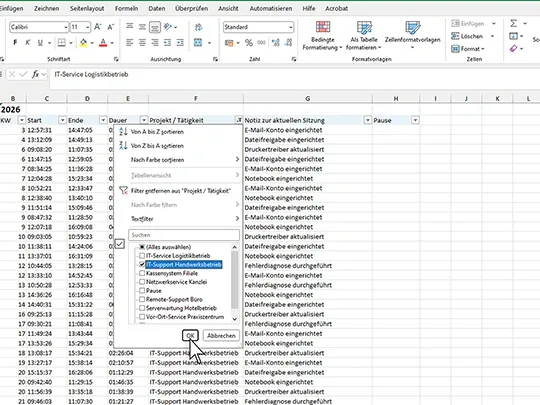
For freelancers, it is not only important to know how long they worked in total. It is equally important to know how many hours actually went into a particular client project.
TYPELOG Worktimer therefore combines ongoing work hours tracking, project and activity assignment, breaks, manual entries, a calendar and export functions in one local application.
Hours are recorded while you work and are then available as structured data. This means working hours no longer have to be reconstructed later from calendars, emails and personal notes.
The application requires no TYPELOG user account, works without mandatory cloud storage and is available for a one-time purchase price.
 TYPELOG Worktimer
Track working hours while you still know what they were spent on.
Track project hours directly, record breaks and create ready-to-use data for Excel, CSV, HTML or PDF.